
Teaching an agent
There are two ways to make an agent better at something. You can keep correcting it, task by task, forever. Or you can teach it once and have the result stick.
The second is what the teach panel is for.
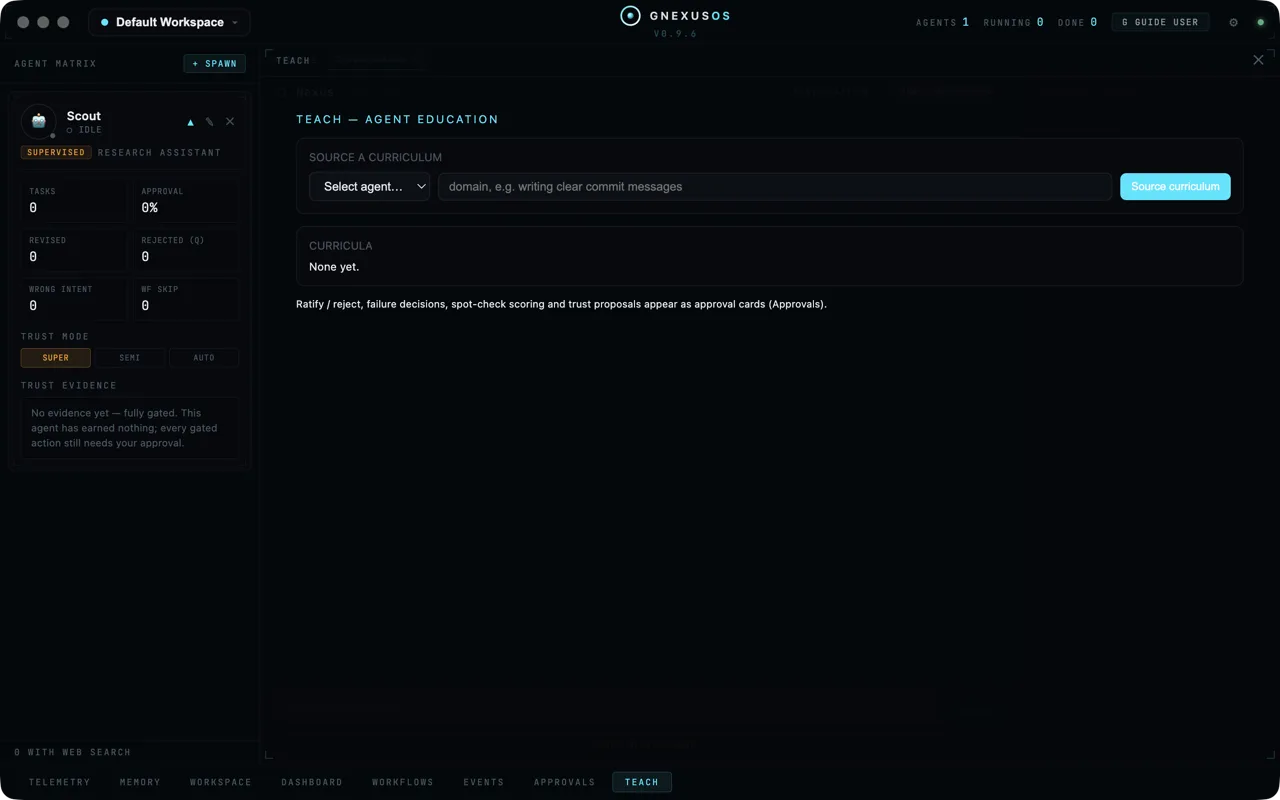
Choose TEACH along the bottom of the window.
Sourcing a curriculum
Under SOURCE A CURRICULUM there are two fields and a button.
Pick the agent from the Select agent… dropdown, then type the subject into the box. The placeholder shows the right level of specificity:
domain, e.g. writing clear commit messages
That is a good example because it is narrow. "Writing" is too broad to teach and too broad to test. "Writing clear commit messages" can be demonstrated, marked and either passed or failed.
Choose Source curriculum and the system builds one.
Before anything exists the list underneath says CURRICULA — None yet.
Running it
Once a curriculum exists you get controls for working through it:
| Control | What it does |
|---|---|
| Run module | Work through a teaching unit |
| Run scenarios | Put the learning into practice |
| Run remediation | Go back over something that failed |
| Check status | See where the curriculum has got to |
| Author skill | Turn what was learned into an installed skill |
| Declare not-run | Record that a unit was deliberately skipped, with a reason |
Declare not-run deserves a word. It exists so that "we did not do this one" is recorded honestly, with your reason attached, rather than left looking like a pass or a gap. A training record that quietly omits what was skipped is not a training record.
Everything you decide goes through approvals
The note at the bottom of the panel says where the decisions appear:
Ratify / reject, failure decisions, spot-check scoring and trust proposals appear as approval cards (Approvals).
So you do not sit watching the teach panel. You get on with your day and the decisions queue up in Approvals.
There are four kinds.
Ratifying a curriculum
Before an agent is taught anything, you see what it is about to be taught and sign it off. The card shows the proposed curriculum and its pass threshold, labelled:
Pass threshold — editable before ratification
You can raise or lower that bar, and only before you ratify. Afterwards it is fixed, so the standard cannot drift once marking begins.
RATIFY approves it. REJECT refuses it, with an optional reason.
Deciding what happens after a failure
When an agent fails part of a curriculum, you choose: REJECT it outright, or send it to REMEDIATION to try again. The card shows what was not demonstrated.
Spot checks
This is the most interesting thing in the app, and it is worth understanding properly.
A spot check shows you a piece of the agent's work and asks you to score it — blind. You cannot see the automated grader's score while you are marking. The card tells you to read first:
Learner's answer (read before scoring)
You SCORE it and SUBMIT, and only then does the grader's score appear. There is a SKIP if you would rather not mark this one, which is recorded honestly:
SKIPPED — not scored, not counted toward agreement.
The point is not to catch out the agent. The skill library explains what it is really for:
blind checks compare your scores with the HR grader's, revealing the grader's only after you submit. If you and the grader disagree consistently, the conclusion is that THE RUBRIC MAY BE WRONG — not that the learner is.
Read that twice. Most systems that grade machine work assume the grader is right and the learner is wrong. This one treats sustained disagreement as evidence that the test is bad. That is why the marking has to be blind — if you could see the grader's score, you would unconsciously drift towards it, and the disagreement signal would disappear.
Trust proposals
When an agent finishes a curriculum well, it can be proposed for more freedom. The card says Proposed: followed by the trust level being asked for, and gives you three buttons:
| Button | What it does |
|---|---|
| RATIFY | Grant the level proposed |
| AMEND TO ↑ | Grant a different level instead |
| DECLINE | Leave the agent where it is |
This is how an agent gets promoted on evidence rather than on a switch you flipped because you were in a hurry. See Working with agents safely.
The skill library
Open System Config (the gear at the top right) and choose Skills.
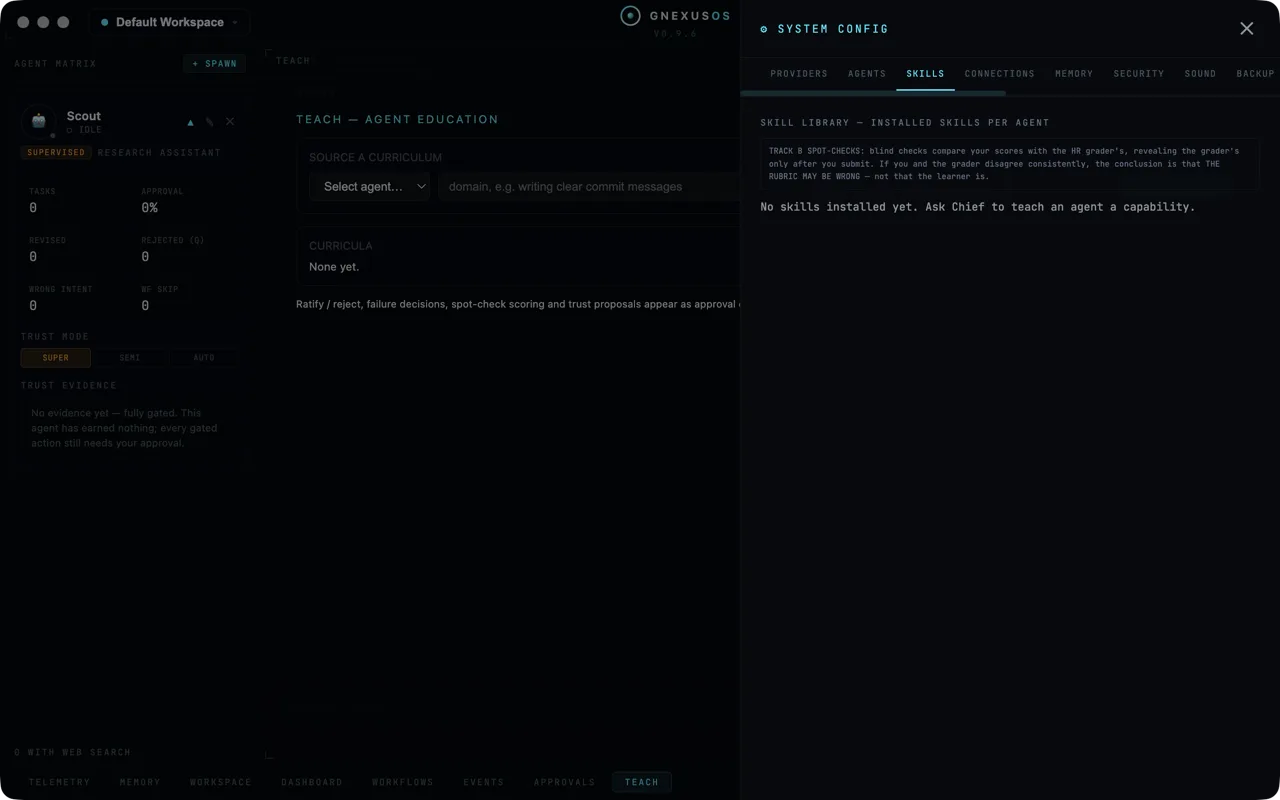
This is SKILL LIBRARY — INSTALLED SKILLS PER AGENT: what each agent has actually learned, agent by agent.
With nothing taught yet it says:
No skills installed yet. Ask [your apex agent] to teach an agent a capability.
(The panel uses your apex agent's own name, whatever you called it during setup. The square brackets are ours.)
Which is the other way in. You do not have to use the teach panel at all — you can simply ask in conversation for an agent to be taught something, and the same machinery runs.
Skills found rather than taught
Sometimes the system finds an existing capability that matches what you need and asks whether to install it. That arrives as a skill-acquisition approval card showing which agent it would be installed to, what the skill instructs, and what is known about it.
Two labels to watch for. No catalog skill covers this means nothing off-the-shelf fits and something would have to be written. NO AUDITS ON RECORD means nobody has checked this skill — treat it the way you would treat a plugin from an author you have never heard of.
The card's DISMISS button is labelled with exactly what it does:
DISMISS (installs nothing, rejects nothing — just closes this request)
When teaching is worth it
Teaching costs provider calls and your attention, so it is not for everything.
Worth teaching: anything you have corrected more than three times. House style. The shape your reports have to take. Rules a client insists on.
Not worth teaching: one-off jobs, and anything you could put in the agent's system prompt in two lines. Edit the agent instead.
Related
- Approvals — where every teaching decision lands.
- Your first agent — trust modes and the counters that back them.