
Connections
On its own, an agent can think and can work with files in your workspace. To do anything beyond that — read a repository, write to a document, search the web — it needs a connection.
Open System Config (the gear at the top right) and choose Connections.
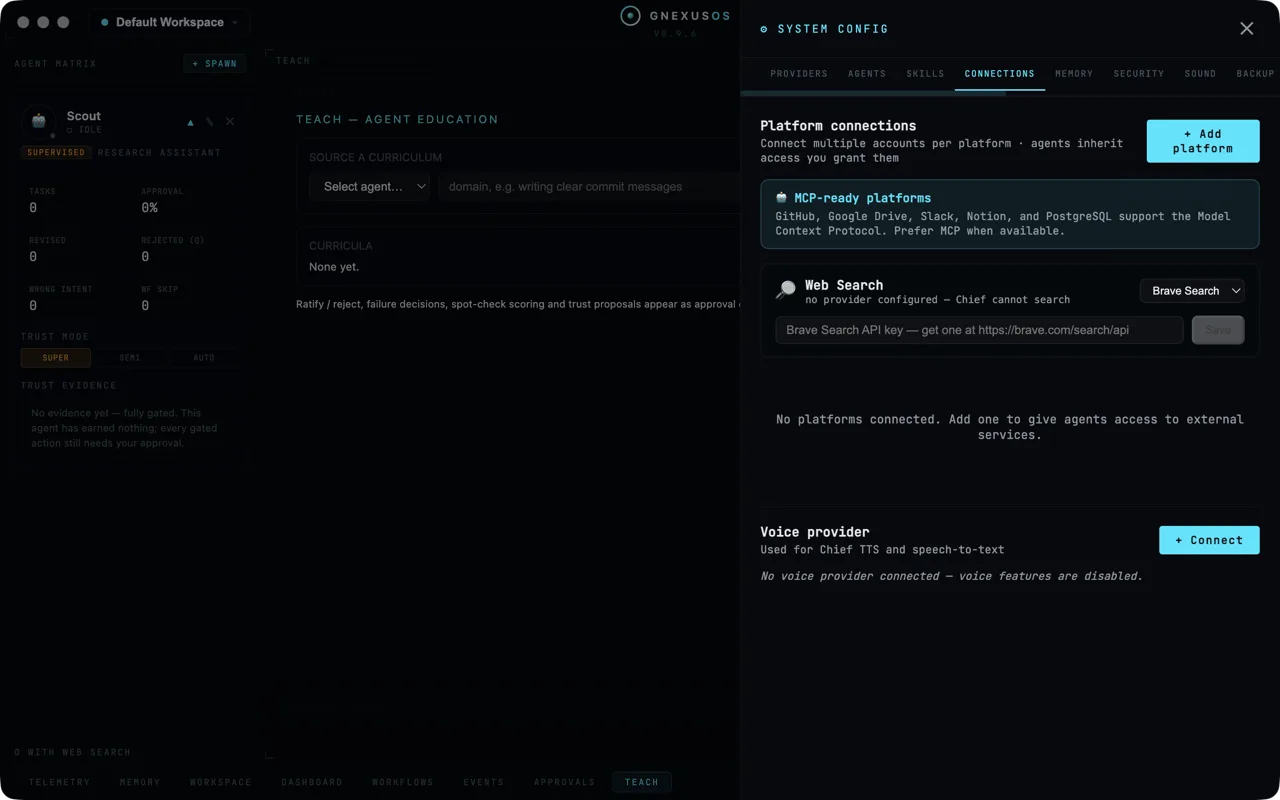
Platform connections
At the top:
Connect multiple accounts per platform · agents inherit access you grant them
Two things in one line. You can connect more than one account to the same service — a work GitHub and a personal one — and agents get exactly the access you hand them, nothing more.
Before you add anything:
No platforms connected. Add one to give agents access to external services.
Use + Add platform to start.
Prefer MCP where it exists
A highlighted note says:
GitHub, Google Drive, Slack, Notion, and PostgreSQL support the Model Context Protocol. Prefer MCP when available.
The Model Context Protocol is a standard way for tools to describe what they can do. When a service supports it, the agent gets a proper list of the available operations rather than a general-purpose connection it has to feel its way around. It is more reliable and easier to reason about, so take the MCP route when it is offered.
Web search
Agents cannot search the web until you give them a way to. Until then the card says:
no provider configured — [your apex agent] cannot search
(The card names your apex agent, whatever you called it during setup. The square brackets are ours, here and below.)
Pick a provider from the dropdown — Brave Search or Tavily — paste its API key, and choose Save. The field tells you where to get one.
GNexusOS does not pick a search engine for you, and does not resell one. The registry of providers is deliberately vendor-neutral: you choose, you hold the key, you pay that company directly. Adding another provider later is a small change on the app's side precisely because no vendor is baked in.
Each agent also has its own Enable web search setting, chosen when you create it. A provider here makes search possible; the agent's own setting decides whether that agent uses it. The main window shows how many of your agents have it switched on.
Search results are not instructions
Worth knowing: anything fetched from the web is handled as untrusted data. A web page that contains text telling an agent to do something is not treated as a command — it is treated as a page that happens to have words on it. That is a real attack, and the app is built on the assumption that it will be tried.
Voice provider
At the bottom:
Used for [your apex agent's] TTS and speech-to-text
and, until connected:
No voice provider connected — voice features are disabled.
Choose + Connect. See Voice for what it unlocks.
The rule behind this panel
Constitutional guarantee 4 reads:
All agent credentials are visible in the credential store
Which means: every credential any agent holds appears on this panel, and you can revoke it here at any time. No agent may keep a credential anywhere else. If an agent provisions something for itself, it goes through the same path as a connection you added by hand, and it shows up in the same list.
The practical consequence is that this panel is a complete answer to "what can my agents reach?" There is no second list somewhere else.
See Governance and the constitution.
Good practice
Connect the least you can. An agent that only needs to read a repository does not need write access to it. The narrower the connection, the smaller the worst case.
Use a separate account where the service allows it. Giving an agent its own account, with its own permissions, is cleaner than sharing yours — and revoking it later costs you nothing.
Never type a credential into the chat. Credential entry is a human-only action by design; it belongs in this panel, not in a message an agent can read.
Review this list occasionally. Connections accumulate. The ones you forgot about are the ones worth removing.
Related
- Workflows — external-event triggers need a connection first.
- Voice — what the voice provider is for.
- Working with agents safely.