
Governance and the constitution
Most software asks you to trust it. This page is about the parts of GNexusOS that are built so you do not have to.
Open System Config (the gear at the top right) and choose Governance.
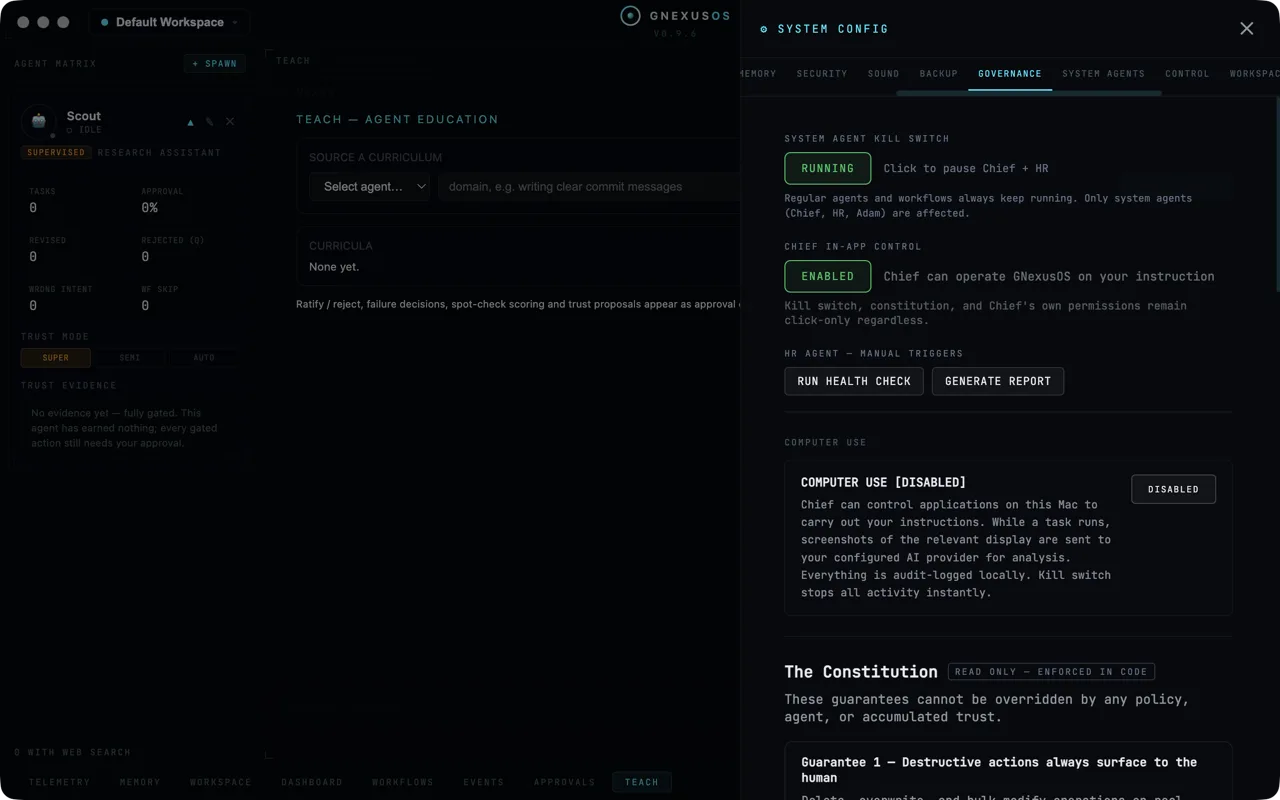
The kill switch
At the top is a single button reading RUNNING. Press it and the system agents stop.
The note underneath is the important part:
Regular agents and workflows always keep running. Only system agents … are affected.
So this is not a panic button that kills everything. It stops the agents that run in the background on their own initiative, and leaves the agents you created doing the work you asked for.
This control is protected. No agent action and no policy change can remove it or switch it off. It lives in the settings panel and does not go through any agent to work. That is written into the app's constitution as a guarantee, not left as a convention.
In-app control
The second switch decides whether the orchestrator may operate GNexusOS itself on your behalf — clicking the things you would click.
When it is on, the panel is explicit about what stays out of reach:
Kill switch, constitution, and [the agent's] own permissions remain click-only regardless.
In other words, the one thing an agent operating the app can never do is widen its own permissions or disable the control that stops it. Those three remain things only a human hand can touch.
Health checks
RUN HEALTH CHECK and GENERATE REPORT trigger the HR agent by hand. It otherwise does this on its own schedule.
The HR agent's job is to watch the other agents and write up what it finds. Its reports cannot be edited after they are written — by any agent, including itself. There is no update path in the storage for them at all. A report that could be revised afterwards would not be worth reading.
The constitution
Scroll down and you reach a section headed The Constitution, badged:
READ ONLY — ENFORCED IN CODE
and introduced with:
These guarantees cannot be overridden by any policy, agent, or accumulated trust.
That sentence is doing real work. Most of this app is configurable. These nine guarantees are not. They are checked in the code that runs every action, and the code that validates new policies refuses any policy that would weaken them.
| # | Guarantee |
|---|---|
| 1 | Destructive actions always surface to the human |
| 2 | Financial transactions always surface to the human |
| 3 | Standalone public account creation is never automated |
| 4 | All agent credentials are visible in the credential store |
| 5 | Any policy is revocable at any time |
| 6 | Immutable reports cannot be modified after creation |
| 7 | The system-agent kill switch is always reachable |
| 8 | The orchestrator never assists with copying the platform |
| 9 | Agents may never execute privileged (sudo/root) commands |
The app shows the full text of each. Three are worth spelling out.
Deleting, paying and signing up
Guarantees 1, 2 and 3 all work the same way: those actions always stop and ask you, whoever asked for them and however much the agent has been trusted. There is no setting that turns them into automatic approvals, because the code that creates settings rejects any that tries.
Guarantee 2 goes further. Banking sites, payment portals and brokerages can never be added to the list of applications an agent may control, no matter what you type into the box.
No administrator commands, ever
Guarantee 9 is the strictest rule in the app and the only one that cannot be unlocked even by you saying yes.
An agent can never run a command as an administrator. Not with your approval, not with earned trust, not with a policy. The command is refused in the code before any approval prompt could appear.
The reason is written into the guarantee itself: an agent with administrator rights could change the platform's own code, switch off the layer that enforces these rules, rewrite the constitution, alter the audit log and erase the evidence. It is the single permission that could dismantle everything designed to contain it.
The app's position is that nothing legitimate needs it. Building, file handling, version control, media work — none of it requires administrator rights. When a job genuinely does, the agent has to write out the command, explain in plain English what it does, and hand it to you to run yourself. Preparing it is allowed. Running it is not.
Policies can always be taken back
Guarantee 5 says you can revoke any policy you have agreed to, at any time, with a sentence. It takes effect immediately — no delay, no confirmation step, no cooling-off period. A revoked policy is treated as though it never existed.
The system agents
Choose System Agents in System Config.
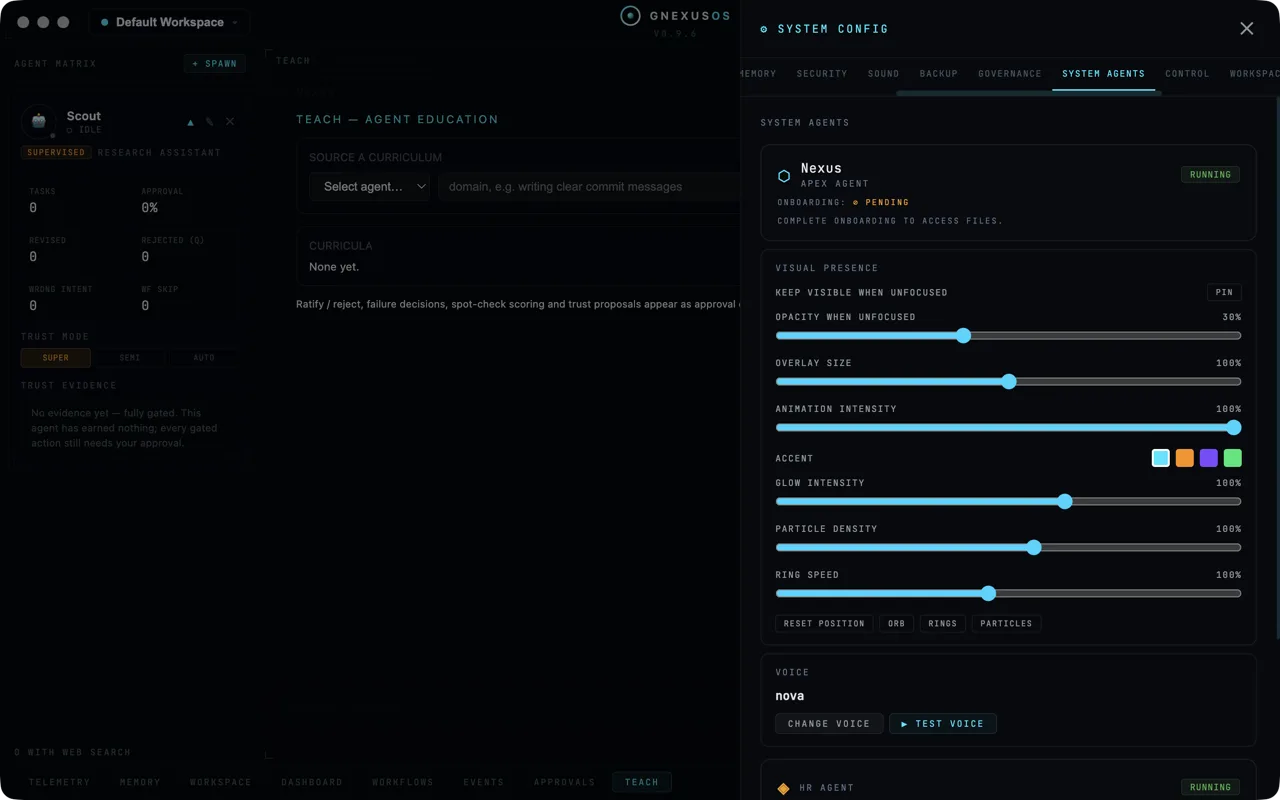
Three agents run alongside the ones you create. They are named during setup, so yours will be called whatever you chose:
| Role | What it does |
|---|---|
| The apex agent | The one you talk to; coordinates the others |
| The HR agent | Watches the agents and reports on them |
| The memory manager | Turns finished work into organised notes |
Each shows RUNNING or paused, and its onboarding state. Until onboarding is complete a system agent says:
COMPLETE ONBOARDING TO ACCESS FILES.
which means exactly what it says — it cannot reach your workspace yet.
Visual presence
The apex agent can float on screen as an orb while you work in other applications. The controls here are all cosmetic: whether it stays visible when the app is not in front, how faint it goes, its size, how much it animates, its accent colour, glow, particles and ring speed, plus RESET POSITION if you have dragged it somewhere awkward.
Turn the animation down if it distracts you. It changes nothing about behaviour.
Voice
Underneath is the voice the apex agent speaks with, a CHANGE VOICE button and ▶ TEST VOICE. See Voice.
Related
- Approvals — where guarantees 1, 2 and 3 land in practice.
- Letting an agent use your computer — the switch at the bottom of this same panel.
- Working with agents safely — how to use all of this well.